Cura Slicer - Professional 3D Printing Software

The world's most trusted 3D printing slicing software used by millions of makers, educators, and professionals worldwide

10M+ Downloads
400+ Printer Profiles
100% Free & Open Source

What is Cura Slicer?

Cura Slicer is a state-of-the-art, free and open-source 3D printing software developed by Ultimaker that transforms your 3D models into precise printing instructions. As the industry's leading slicing application, Cura Slicer bridges the gap between your creative 3D designs and physical printed objects with unmatched precision and reliability.

Whether you're a hobbyist exploring the exciting world of 3D printing, an educator teaching design principles, or a professional engineer creating functional prototypes, Cura Slicer provides the comprehensive toolset you need to achieve exceptional print quality. With over 10 million downloads worldwide, Cura Slicer has established itself as the go-to solution for anyone serious about 3D printing excellence.

The software excels at converting your STL, OBJ, 3MF, and other 3D file formats into G-code instructions that your 3D printer can understand and execute. But Cura Slicer goes far beyond basic slicing - it empowers you with hundreds of customizable parameters, intelligent print optimization algorithms, and extensive material profiles that ensure your prints come out perfectly every single time.

Powerful Features for Perfect Prints

Everything you need to transform your 3D designs into reality

⚙️

400+ Printer Profiles

Pre-configured settings for hundreds of 3D printers from all major manufacturers. Simply select your printer model and start printing immediately with optimized settings.

🎯

Advanced Slicing Engine

Industry-leading slicing algorithms ensure optimal layer adhesion, minimal print time, and superior surface quality for all your 3D printing projects.

🔧

Expert Settings Control

Access to hundreds of customizable parameters including layer height, infill density, support structures, print speed, and temperature settings for ultimate control.

📊

Material Profiles

Extensive library of material profiles for PLA, ABS, PETG, TPU, Nylon, and specialty filaments with pre-optimized settings for each material type.

👁️

3D Preview Visualization

Real-time layer-by-layer visualization lets you inspect every aspect of your print before sending to the printer, saving time and material.

🔌

Plugin Ecosystem

Extend functionality with community-developed plugins for post-processing scripts, specialized support generation, and workflow automation.

Why Choose Cura Slicer for Your 3D Printing?

Cura Slicer stands out as the premier choice for 3D printing enthusiasts and professionals for numerous compelling reasons. The software combines professional-grade capabilities with an intuitive interface that makes advanced 3D printing accessible to everyone.

  • Completely free and open-source with no hidden fees or premium tiers
  • Regular updates with new features and printer support
  • Cross-platform compatibility - works on Windows, macOS, and Linux
  • Active community of millions of users sharing profiles and tips
  • Professional-grade features rivaling expensive commercial software
  • Comprehensive documentation and tutorial resources
  • Multi-language support for global accessibility
  • Cloud integration for profile syncing across devices
Download Cura Slicer Free
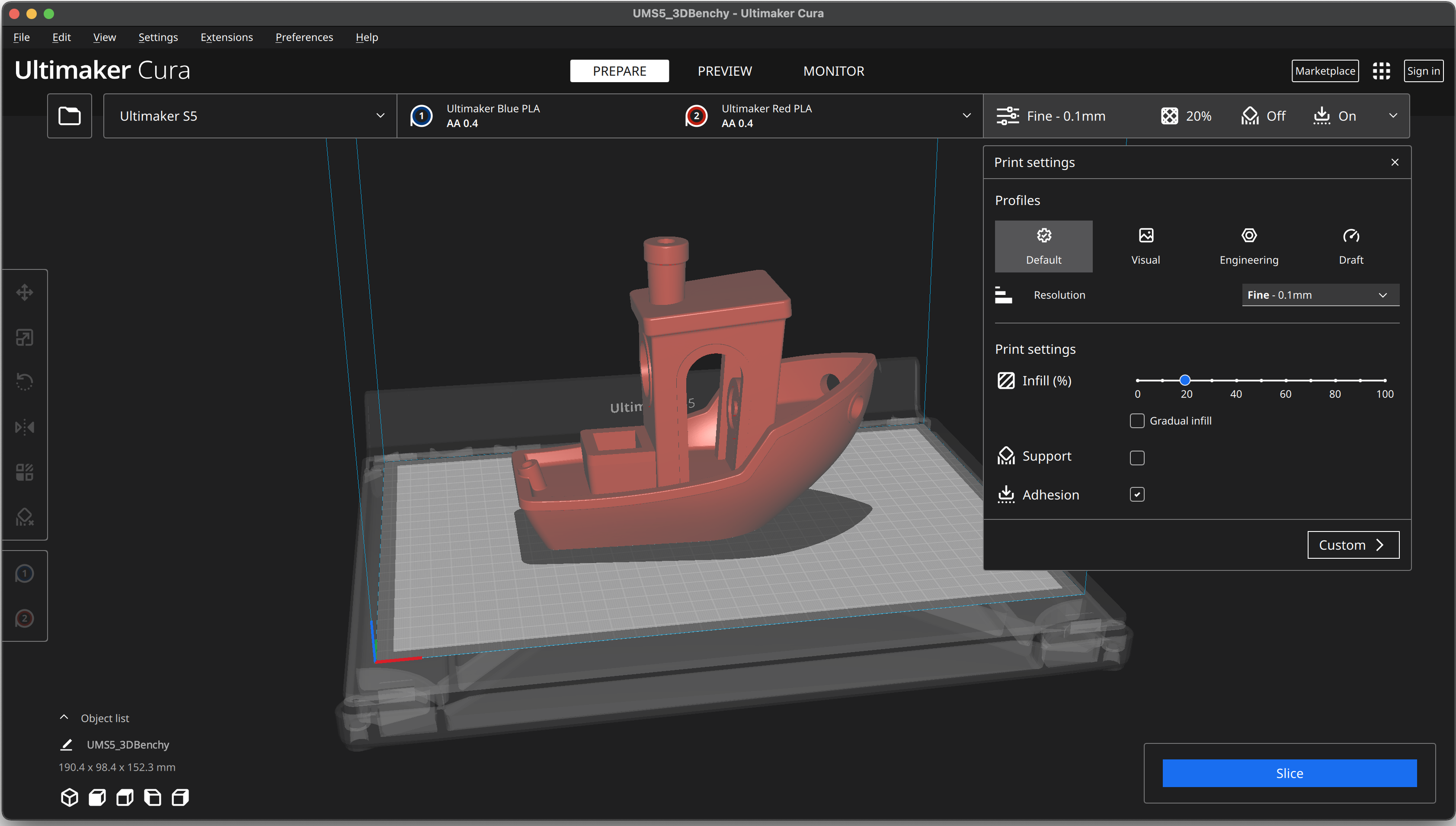
Cura Slicer User Interface showing 3D model slicing

Comprehensive 3D Printing Capabilities

Intelligent Support Generation

Cura Slicer includes sophisticated support structure algorithms that automatically analyze your 3D model and generate only the necessary support material. The software offers multiple support patterns including lines, grid, and tree supports, each optimized for different model geometries. Tree supports are particularly innovative, using less material while providing robust support where needed, making support removal significantly easier.

Print Time and Material Estimation

Before you commit to a print, Cura Slicer provides accurate estimates of printing time and material usage. This feature helps you plan your printing schedule, manage filament inventory, and calculate project costs with precision. The software analyzes every toolpath and calculates realistic completion times based on your specific printer capabilities.

Multi-Material and Multi-Extruder Support

For printers equipped with multiple extruders, Cura Slicer offers comprehensive multi-material printing capabilities. You can assign different materials to different parts of your model, create vibrant multi-color prints, or combine materials with different properties like flexible and rigid sections in a single print job.

Adaptive Layer Heights

The adaptive layer height feature automatically adjusts layer thickness based on your model's geometry. Curved and detailed areas receive thinner layers for superior surface quality, while flat areas use thicker layers for faster printing. This intelligent approach optimizes the balance between print quality and speed.

Advanced Infill Patterns

Choose from over a dozen infill patterns including grid, triangular, cubic, gyroid, and lightning patterns. Each pattern offers different benefits in terms of strength, flexibility, material usage, and print speed. The gyroid pattern, for example, provides excellent strength in all directions while using minimal material.

Customizable Print Profiles

Create and save unlimited custom print profiles tailored to your specific needs. Whether you're optimizing for speed, quality, strength, or material efficiency, you can save your preferred settings combinations and switch between them instantly. Share your custom profiles with the community or import profiles created by other users.

Post-Processing Scripts

Cura Slicer includes powerful post-processing capabilities that let you modify G-code after slicing. Add pause commands for filament changes, implement custom temperature towers for calibration, insert time-lapse photography triggers, or create complex multi-stage prints with varying parameters.
Getting Started with Cura Slicer

Follow these simple steps to start your 3D printing journey

1

Download & Install

Download Cura Slicer for your operating system and run the installer. The setup wizard will guide you through the installation process.

  • Available for Windows, macOS, and Linux
  • Quick 5-minute installation
  • Automatic file associations for 3D models
2

Add Your Printer

Select your 3D printer from the extensive list of 400+ supported models. Can't find yours? Create a custom printer profile easily.

  • Pre-configured printer profiles
  • Custom printer setup option
  • Network printer support
3

Import Your Model

Drag and drop your 3D model files (STL, OBJ, 3MF) into Cura. Use the tools to position, rotate, and scale your model on the virtual print bed.

  • Multiple file format support
  • Easy positioning tools
  • Automatic model repair
4

Configure Settings

Choose from recommended presets or customize settings like layer height, infill density, support structures, and print speed.

  • Beginner-friendly recommended mode
  • Advanced custom settings
  • Material-specific profiles
5

Slice & Preview

Click the Slice button and watch as Cura processes your model. Preview the layer-by-layer breakdown and check estimated print time.

  • Fast slicing engine
  • Layer-by-layer visualization
  • Time and material estimates
6

Export & Print

Save the G-code to an SD card, USB drive, or send directly to your network-enabled printer. You're ready to start printing!

  • Multiple export options
  • Direct network printing
  • Cloud integration support

Watch: Cura Slicer Tutorial for Beginners

Join Millions of Cura Slicer Users

Cura Slicer benefits from one of the most vibrant and supportive communities in the 3D printing world. With millions of active users across the globe, you'll never be alone in your 3D printing journey. The community is filled with experienced users ready to help troubleshoot issues, share optimized print profiles, and offer advice on achieving the best possible results.

The open-source nature of Cura Slicer means that the software is constantly evolving with contributions from talented developers worldwide. New features, bug fixes, and improvements are regularly integrated into the software, ensuring that you always have access to the latest advances in 3D printing technology.

Whether you're printing miniatures, functional prototypes, architectural models, educational tools, or artistic creations, Cura Slicer provides the professional-grade capabilities you need to succeed. The software is trusted by leading universities, research institutions, manufacturing companies, and individual makers who demand reliability and precision from their 3D printing workflow.

Frequently Asked Questions

Quick answers to common questions

Is Cura Slicer really free?

Yes! Cura Slicer is completely free and open-source software. There are no hidden fees, premium versions, or subscription costs. All features are available to everyone at no charge.

Which 3D printers are compatible with Cura Slicer?

Cura Slicer supports over 400 3D printer models from all major manufacturers including Ultimaker, Prusa, Creality, Anycubic, Ender, and many more. If your printer isn't listed, you can create a custom printer profile.

Can I use Cura Slicer for commercial projects?

Absolutely! Cura Slicer's open-source license (LGPL) allows both personal and commercial use without any restrictions or fees.

How do I update Cura Slicer?

Cura Slicer will notify you when a new version is available. Simply download and install the latest version from our download page. Your settings and profiles will be preserved during the update.

Where can I get help if I have problems?

You can find video tutorials and community support through our contact page. The Cura community is also an excellent resource for troubleshooting and tips.

Ready to Start Your 3D Printing Journey?

Download Cura Slicer today and join millions of makers creating amazing things

Download Cura Slicer Free